




Everyone uses AI, but 90% of users are stuck getting generic, robotic, and unhelpful text. The difference between a novice who gets frustrated with AI and a power user who saves 20 hours a week comes down to one thing: the instructions they give. If you want to unlock the true potential of large language models, you need the best ChatGPT prompts available.
Whether you are architecting a complex web application, hunting down a server vulnerability, or just trying to organize your daily sprint, a well-engineered prompt acts as a force multiplier.
This ultimate guide curates the best ChatGPT prompts tailored specifically for tech professionals, developers, and power users. We will move beyond basic questions and dive into advanced prompt engineering frameworks that turn AI into your personal senior developer, security analyst, and productivity coach.
The Anatomy of a Perfect Prompt (Prompt Engineering 101)
Before diving into the copy-paste templates, it is crucial to understand why the best ChatGPT prompts work. If you just type “write code for a login page,” you will get a messy, generic output.
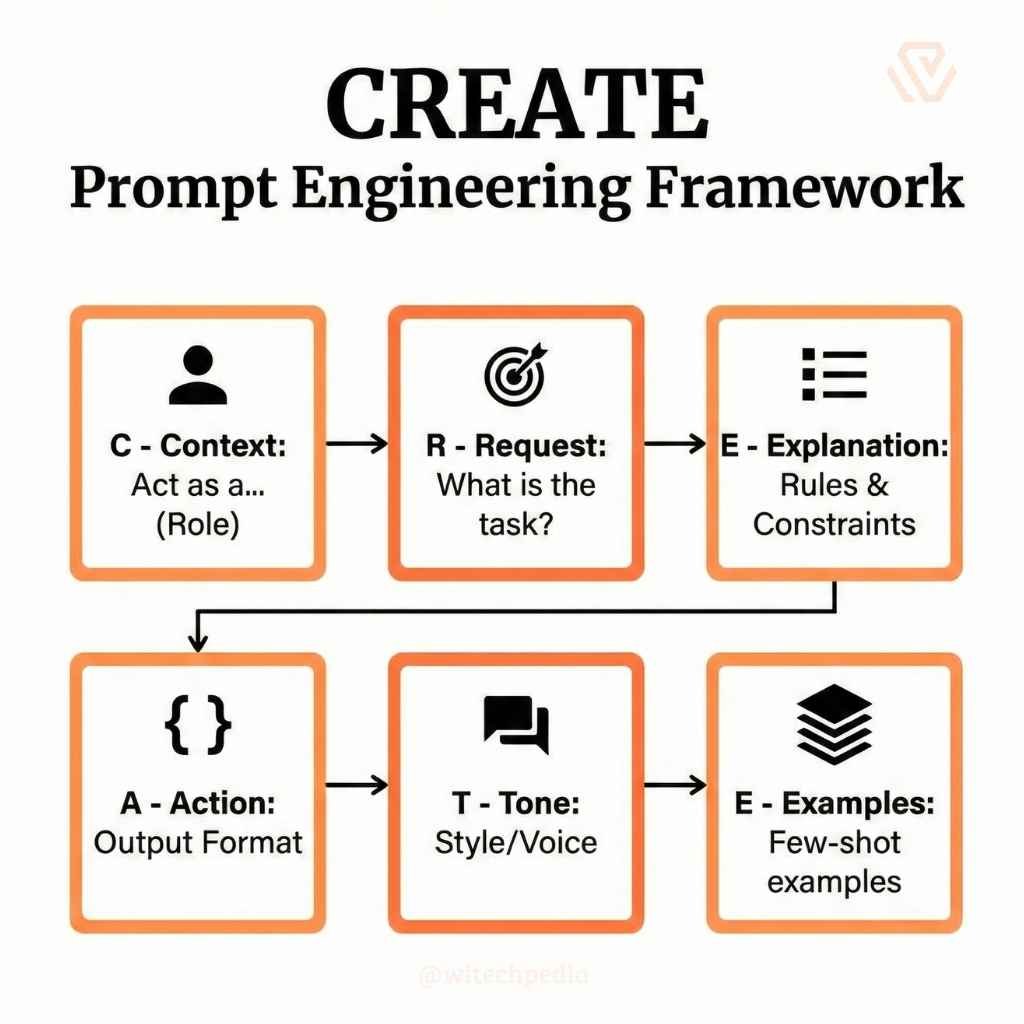
You need a solid prompt engineering framework. We use the CREATE Framework to structure high-level instructions:
Pro Tip: For a deep dive into foundational prompting mechanics, bookmark theOfficial OpenAI Prompt Engineering Guide.
Best ChatGPT Prompts for Coding & Development
After years navigating the full-stack landscape, I can confidently say that writing CRUD boilerplate and untangling legacy spaghetti code are the biggest drains on a developer’s time. Use these ChatGPT prompts for coding to accelerate your build phase.
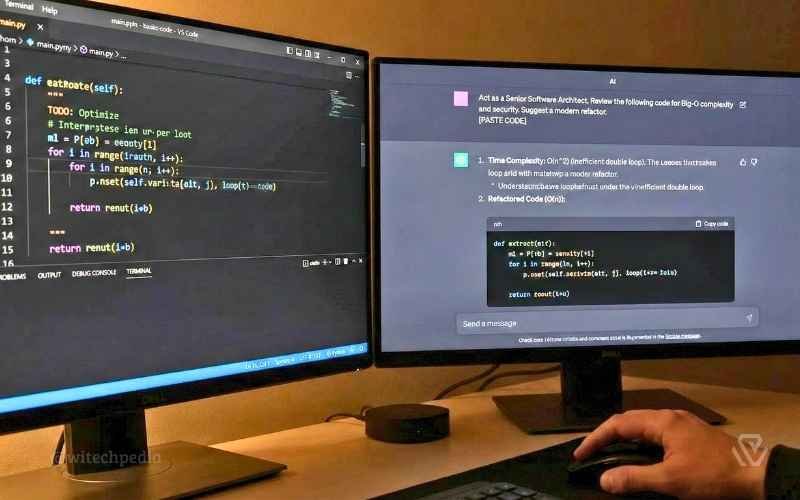
The “Senior Architect” Code Reviewer
Stop pushing messy commits. Use this ChatGPT system prompt to get a brutal but helpful code review before you open a Pull Request.
Prompt: > “Act as a Senior Software Architect. Review the following code snippet for Big-O time and space complexity, security vulnerabilities, and adherence to DRY (Don’t Repeat Yourself) principles. Suggest a modern refactored version that improves performance. Output the refactored code and a bulleted list explaining your changes. [PASTE CODE]“
The API Boilerplate Generator
Prompt: “Act as a Backend Developer. Generate a secure RESTful API boilerplate using Node.js and Express. Include CRUD endpoints for a ‘User’ model (Create, Read, Update, Delete). Ensure password hashing using bcrypt, input validation, and a basic JWT authentication middleware. Format the response as separate code blocks with filenames.”
The Database Schema Designer
Prompt: “I am building a SaaS application for project management. Generate an optimized PostgreSQL database schema. I need tables for Users, Workspaces, Projects, Tasks, and Comments. Include appropriate foreign keys, indexes for fast querying, and timestamp fields. Output the raw SQL commands to create these tables.”
WiTechPedia’s Suggestion
Once you’ve generated your initial boilerplate, bugs are inevitable. Head over to our comprehensive guide on the best prompts for debugging code to learn how to fix Python, JS, and C++ errors instantly.
Advanced ChatGPT Prompts for IT & Cybersecurity
Sysadmins and SOC analysts have zero margin for error. These advanced ChatGPT prompts help automate infrastructure planning and threat analysis securely.
The Regex Wizard (Secure Data Validation)
Regular Expressions are notoriously difficult to write and easy to mess up (leading to ReDoS attacks).
Prompt: “Act as a Cybersecurity Analyst. Write a highly secure Regular Expression (Regex) to validate a complex password. The rules are: minimum 12 characters, at least one uppercase, one lowercase, one number, and one special character. Crucially, explain how this regex prevents Catastrophic Backtracking (ReDoS) vulnerabilities.”
The Cloud Infrastructure (IaC) Planner
Prompt: “Act as a Cloud Architect. Write a Terraform script to provision a secure AWS VPC. It must include two public subnets, two private subnets across different Availability Zones, an Internet Gateway, and a NAT Gateway. Restrict the default Security Group to deny all inbound traffic. Add inline comments explaining the architecture.”
- Internal Link: When a breach inevitably happens, you need to document it fast. Use our Best Prompts for Cybersecurity Incident Reports to automate your NIST-compliant post-mortems.
Best ChatGPT Prompts for Productivity & Deep Work
You don’t have to be a developer to leverage AI. These are the best ChatGPT prompts for productivity to reclaim hours of your day.
The Feynman Technique Skill Learner
If you are struggling to grasp a new framework like Kubernetes or Rust, use the Feynman technique.
Prompt: “Act as an expert computer science professor. Use the Feynman Technique to explain the concept of [Insert Complex Topic, e.g., Docker Containerization] to me as if I were a 12-year-old. Use clear analogies related to everyday life, avoid technical jargon, and test my understanding with a simple question at the end.”
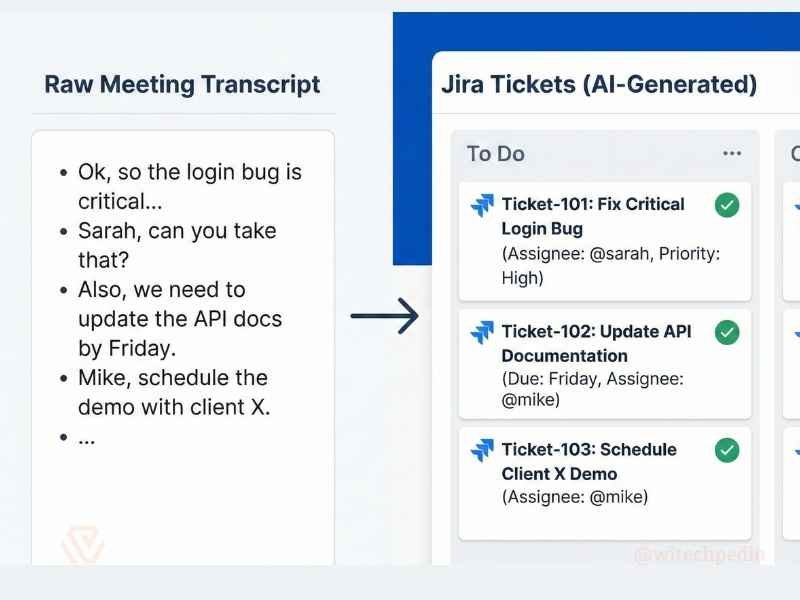
The Meeting Summarizer & Ticket Creator
Prompt: “Take the following rough meeting transcript and convert it into a structured summary. Extract the core decisions made, list the action items assigned to specific people, and draft three ready-to-use Jira tickets with clear ‘Acceptance Criteria’ based on the discussion. [PASTE TRANSCRIPT]“
Next-Level Hacks: ChatGPT Chain of Thought Prompting
If you are dealing with complex math, logic puzzles, or multi-step algorithms, standard prompting often leads to AI hallucinations. You need to use ChatGPT chain of thought prompting.
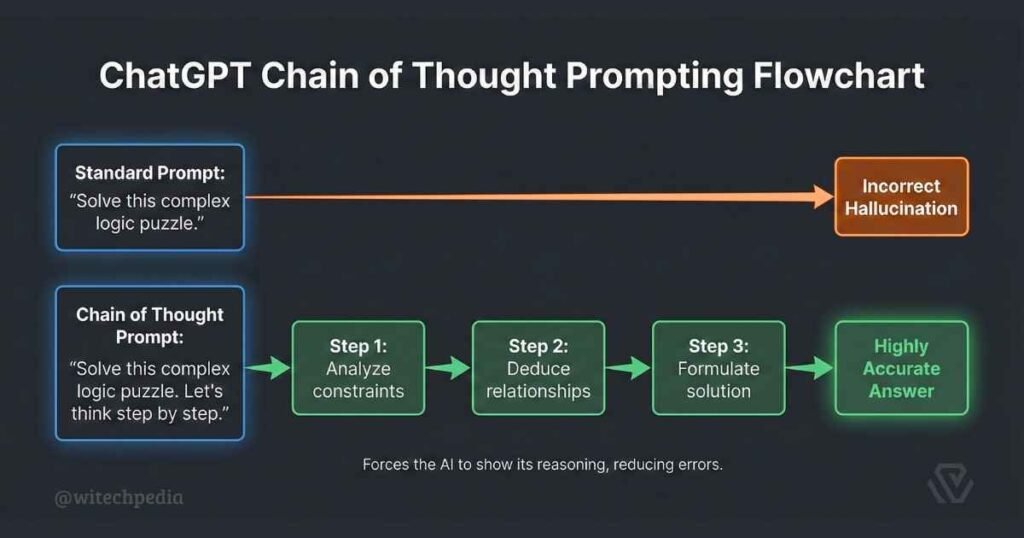
This technique forces the AI to break down its reasoning before giving the final answer.
How to use it: Simply append the phrase “Let’s think step by step” to the end of any complex prompt.
Example Prompt: “Calculate the server load required to handle 10,000 concurrent websocket connections assuming each connection transmits 5KB of data per second. Let’s think step by step, showing all math and assumptions before concluding.“
By forcing the model to show its work, you drastically increase the accuracy of the final output. For more advanced prompting techniques, the open-source Learn Prompting course is a fantastic external resource.
Frequently Asked Questions (FAQ)
Can ChatGPT replace software developers?
No. ChatGPT replaces developers who refuse to use AI. It is an incredible tool for generating boilerplate, refactoring, and debugging, but it lacks the contextual business logic and architectural foresight required to build secure, scalable enterprise software from scratch.
What is the token limit for ChatGPT prompts?
Do not type them out every time. Create a Notion database, a dedicated Markdown file, or use a text expander tool (like Espanso or TextExpander) to store your best ChatGPT prompts and trigger them with keyboard shortcuts.
How do I save and organize my best ChatGPT prompts?
Do not type them out every time. Create a Notion database, a dedicated Markdown file, or use a text expander tool (like Espanso or TextExpander) to store your best ChatGPT prompts and trigger them with keyboard shortcuts.
Final Thoughts
An AI model is only as intelligent as the instructions it receives. By mastering the CREATE framework and integrating these best ChatGPT prompts into your daily workflow, you transition from simply “chatting” with an AI to commanding a highly capable digital assistant.
Start building your personal prompt library today. Copy the templates above, modify them for your specific tech stack, and watch your productivity multiply.
Want to level up your data management next? Check out our guide on the Best Prompts for Excel Formulas & Macros to automate your spreadsheets.