





When a data breach hits, the clock is ticking. You have 72 hours to report to regulators under frameworks like GDPR or CCPA, but you are likely stuck parsing thousands of lines of server logs. In 2026, you don’t need to fight the fire and write the paperwork manually.
If you are looking for the best prompts for cybersecurity incident reports, this guide is your new Incident Response (IR) playbook.
AI tools like ChatGPT Enterprise and Microsoft Security Copilot can act as your “Incident Scribe,” automating the documentation process so you can focus on containment. This guide provides a library of SOC analyst ChatGPT prompts strictly aligned with the NIST SP 800-61 Computer Security Incident Handling Guide.
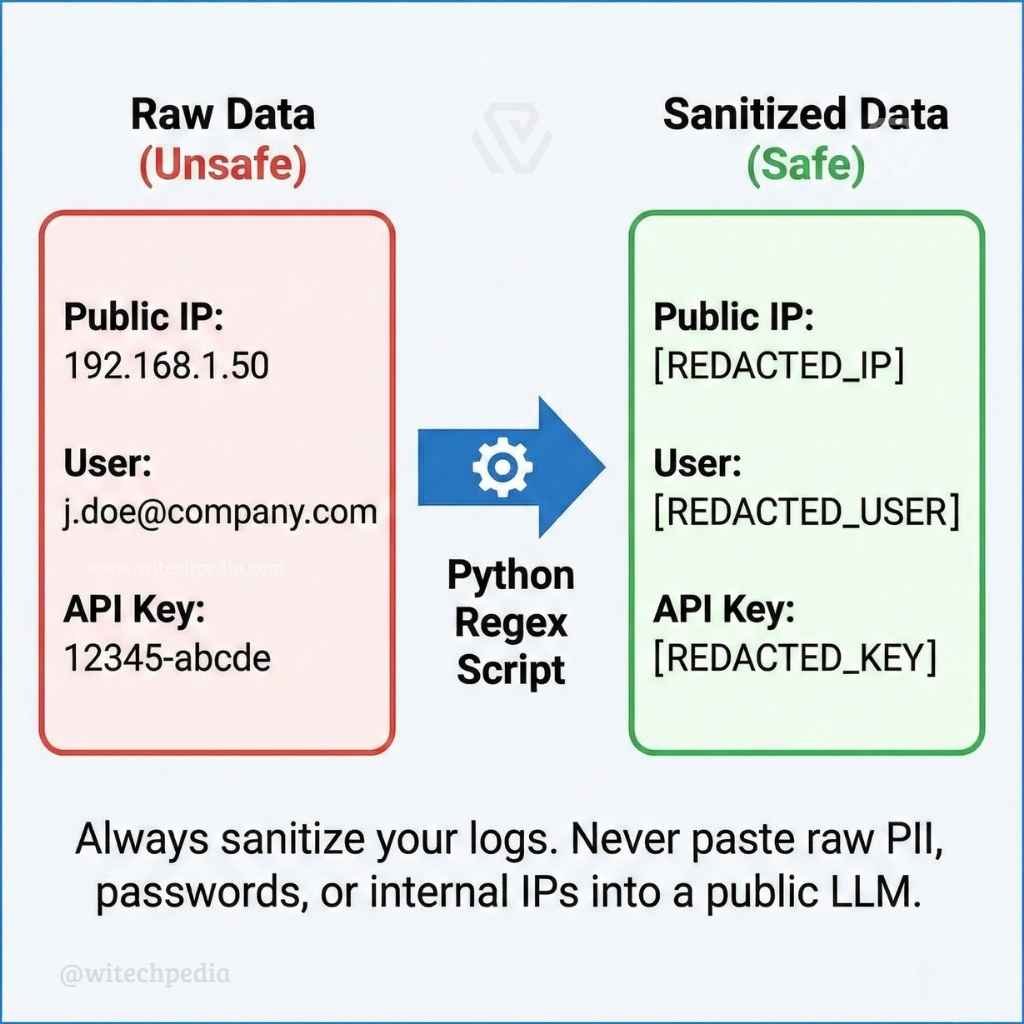
Warning: AI is powerful, but it is not a secret keeper. Never paste unredacted PII (Personally Identifiable Information), IP addresses, or passwords into a public LLM. Read the “Zero Trust” section below before you begin.
The “Zero Trust” Rule for SOC Analyst ChatGPT Prompts
Before using any AI tool to draft a report, you must “sanitize” your data. Pasting customer data into an AI model can turn a minor incident into a major compliance violation.
The “Data Sanitizer” Prompt Use this prompt to strip sensitive data locally via a script or to ask the AI how to do it safely.
Prompt: “Act as a Data Privacy Officer. I need to analyze a server log for a security incident. List exactly which fields (e.g., Public IPs, Usernames, API Keys, MAC Addresses) I must redact or tokenize to make this data safe for analysis in an LLM. Provide aPython 3 regex scriptto replace these fields with placeholders like [REDACTED_IP].”
Phase 1: Phishing Email Analysis & Log Parsing
The first phase of the NIST incident response steps is identifying the threat. Use these prompts to cut through the noise and analyze vectors quickly.
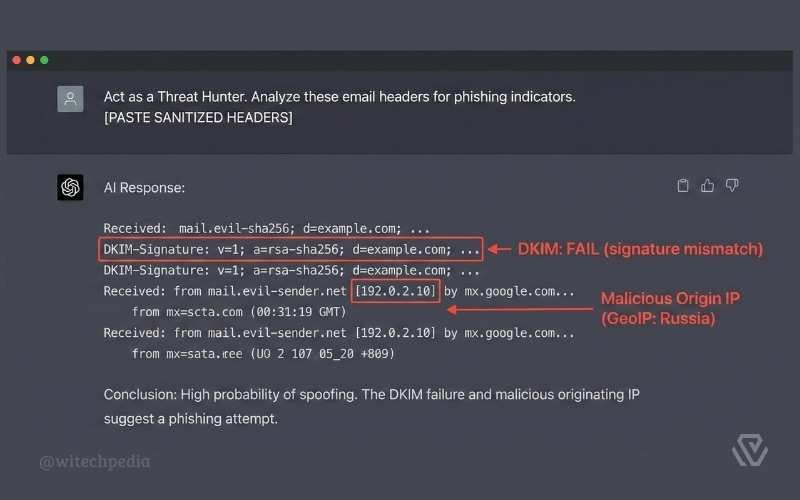
Automated Phishing Email Analysis
Stop staring at raw text. Let AI trace the attack path for you.
Prompt: “Act as a Threat Hunter. I am pasting the sanitized headers of a suspicious email below.
- Trace the ‘Received-By’ path to identify the originating IP address.
- Check the SPF, DKIM, and DMARC results—did they pass or fail?
- Explain in plain English if this looks like a spoofing attempt or a compromised legitimate account.
[PASTE SANITIZED HEADERS]“
Summarize Server Logs for Indicators of Compromise (IOCs)
Prompt: “I am pasting a snippet of sanitized syslog entries from our firewall. Group these logs by ‘Event Type’ and ‘Frequency’. Identify any anomalies that suggest a brute-force attack, port scanning, or SQL injection attempts.”
- Pro Tip: If your logs are exported as messy CSV files, clean them up first using the strategies in our guide on the Best Prompts for Excel Formulas & Macros.
Phase 2: Best Prompts for Cybersecurity Incident Reports: The Final Document
This is the most critical part for compliance and legal protection. These are the best prompts for cybersecurity incident reports to help you generate the final artifact for management and regulators.
Generate an Automated Executive Summary
Prompt: “Rewrite this technical incident timeline into a 1-page Executive Summary for the Board of Directors.
- Remove technical jargon like ‘buffer overflow’ or ‘lateral movement’.
- Focus strictly on: 1. Business Impact (Downtime duration). 2. Data Risk (Was customer data accessed?). 3. Current Mitigation Status.”
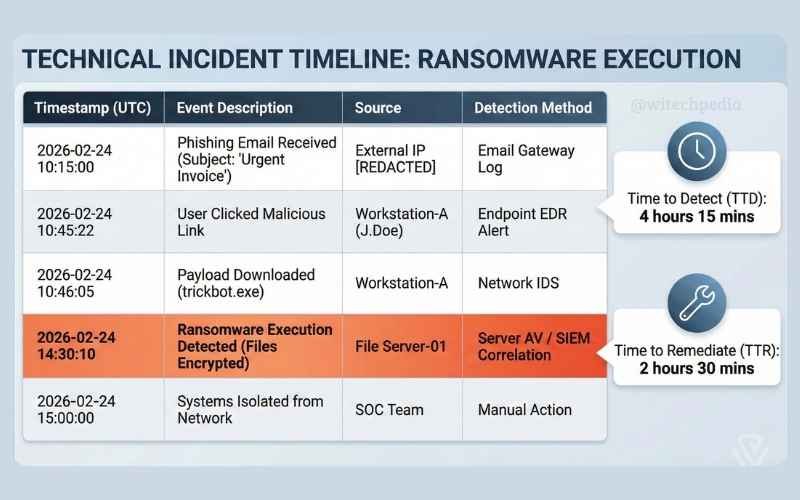
Technical Incident Timeline Generation
Prompt: “Convert these raw SOC analyst notes into a chronological ‘Timeline of Events’ table for our official incident report.
- Format: Timestamp (UTC) | Event Description | Source | Detection Method.
- Clearly highlight the ‘Time to Detect’ (TTD) and ‘Time to Remediate’ (TTR).
[PASTE NOTES]“
Phase 3: Root Cause Analysis Prompts & Mitigation
The post-incident activity phase is often skipped, but it is the only way to prevent the next hack. If you need policy frameworks to base your mitigation on, the SANS Institute Policy Templates are an excellent starting point.
The 5 Whys Root Cause Analysis Prompt
Prompt: “Perform a Root Cause Analysis (RCA) on this incident using the ‘5 Whys’ technique.
- Problem: The database server was encrypted by ransomware.
- Drill down: Ask ‘Why’ logically until you find the process failure (e.g., missing patch, weak password policy, or lack of MFA). Do not stop at ‘human error’.”
Propose Security Mitigations (OWASP & NIST)
Prompt: “Based on this incident (caused by an unpatched vulnerability), suggest 3 strategic security improvements. Map each recommendation to theOWASP Top 10 vulnerabilities listto ensure we are covering industry-standard web application risks.”
- Pro Tip: Once you identify the vulnerability in your Root Cause Analysis, developers can use our guide on the Best Prompts for Debugging Code to patch the software safely.
Frequently Asked Questions (FAQ)
Can AI replace a SOC Analyst?
No. AI is a force multiplier, not a replacement. It excels at phishing email analysis and summarizing logs, but it lacks the intuition to understand business context or make critical containment decisions.
How do I anonymize logs quickly?
You should use local scripts (Python/Powershell) to scrub data before it leaves your network. Never rely on the AI to “promise” not to store your data unless you are on an Enterprise instance with a Zero-Data-Retention agreement.
What is the difference between an Executive Summary and a Technical Report?
An Executive Summary focuses on risk and cost (for the C-suite), while a Technical Report focuses on IOCs (Indicators of Compromise) and forensics (for the IT team). You need both.
Conclusion
Documentation is often the most hated part of cybersecurity, but it is the only thing that saves you during an audit. By using these best prompts for cybersecurity incident reports, you can ensure your documentation is accurate, compliant, and written in half the time.
Ready to secure your workflow?
- Fix the vulnerabilities you found in your Root Cause Analysis.
- Manage your asset inventory and log data efficiently.