




The era of static chatbots is over. To stay competitive in the modern tech landscape, you need to know how to build agentic AI—systems that don’t just “chat” but actually execute complex tasks. While traditional AI relies on human prompting for every step, agentic AI uses iterative reasoning to plan, use tools, and self-correct.
In this guide, we will walk through the architectural requirements and the step-by-step implementation of autonomous agents.
The Core Architecture to Build Agentic AI
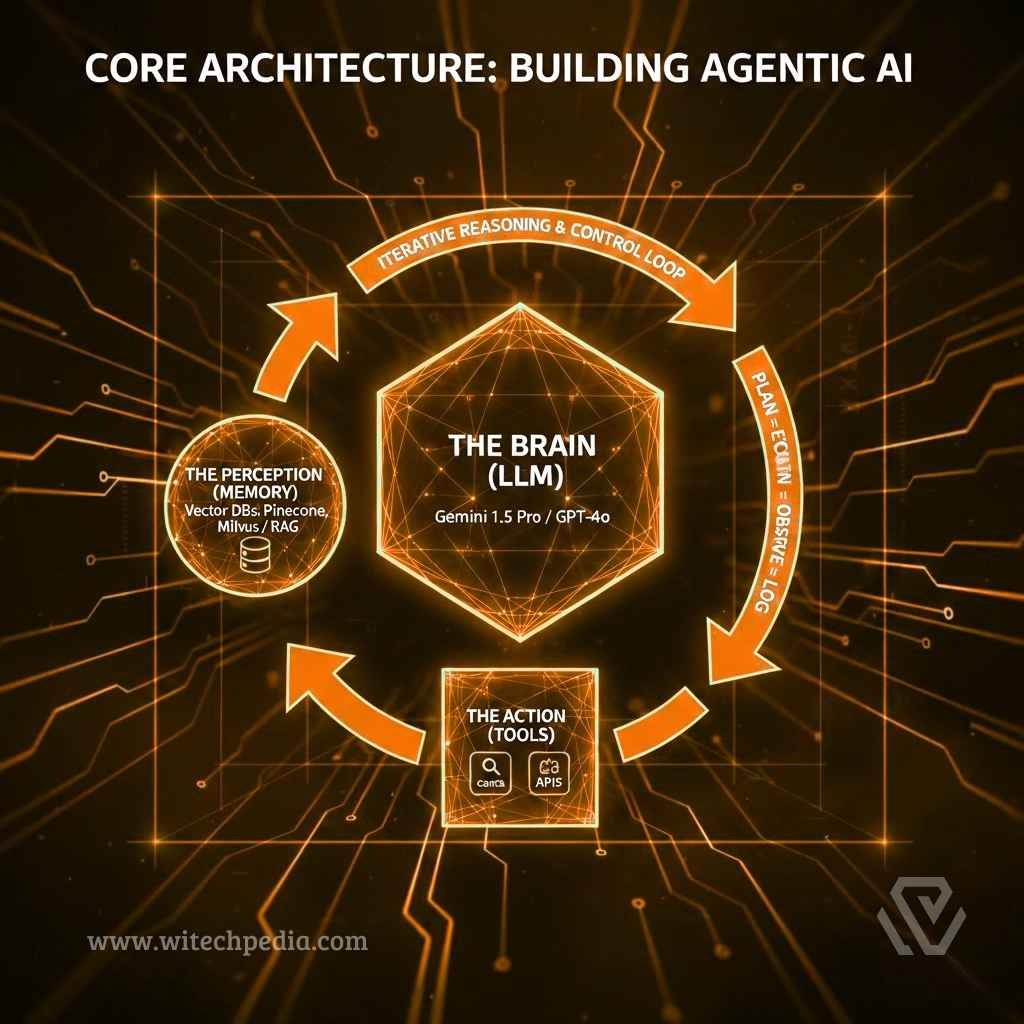
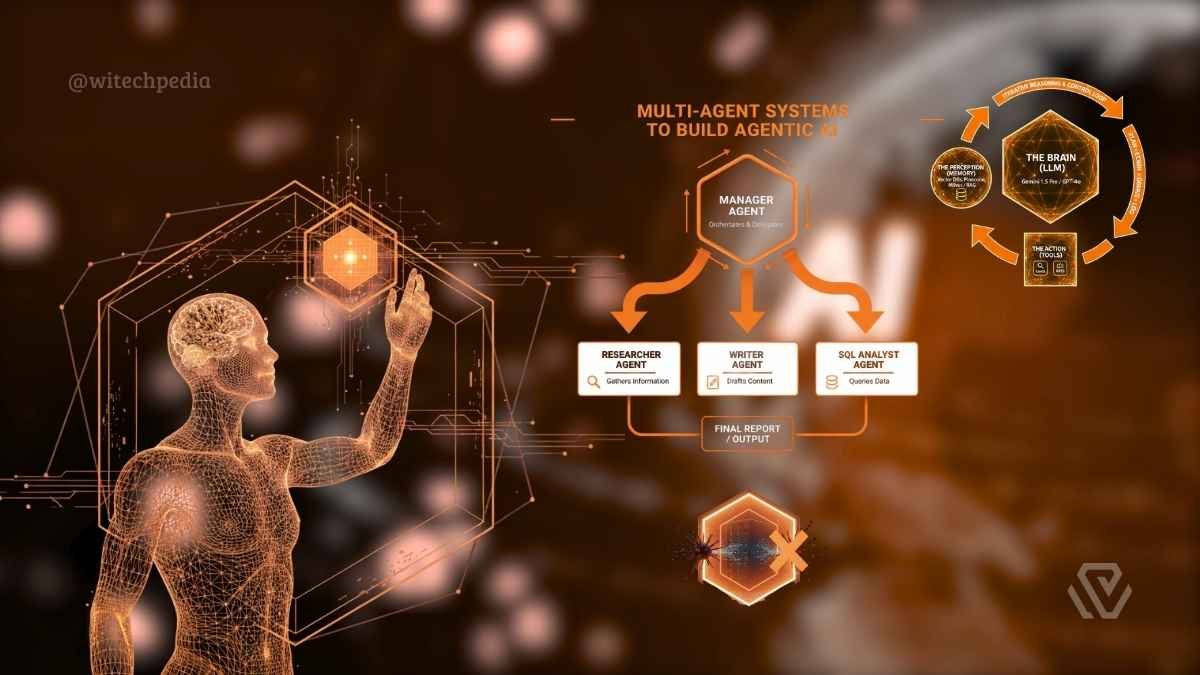
Before you start coding, you must design the “brain” of your system. To build agentic AI that is reliable, your architecture must include three core pillars:
- The Reasoning Engine: Typically a high-reasoning model like Google Gemini 1.5 Pro or GPT-4o.
- The Toolset (Action Layer): This allows the agent to interact with the world via APIs, web search, or code execution.
- The Memory (Context Layer): Utilizing vector databases like Pinecone or Milvus to give your agent long-term “recollections” of past tasks.
Frameworks Used to Build Agentic AI
You don’t have to build the logic from scratch. When learning how to build agentic AI, the framework you choose determines your development speed and system stability:
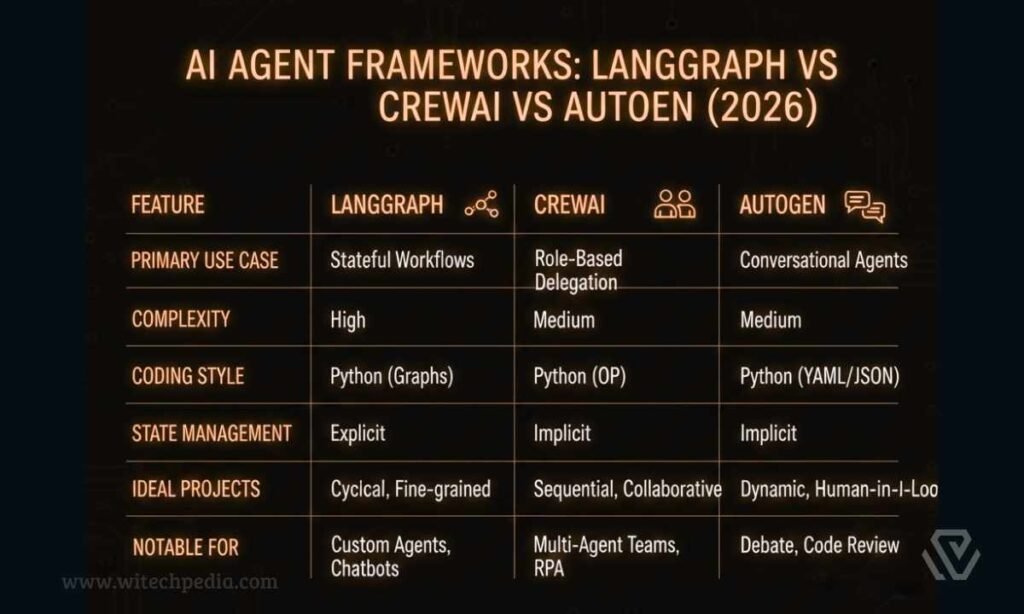
- LangGraph (by LangChain): Perfect for developers who need cyclical graphs and fine-grained state management. See the LangGraph Documentation.
- CrewAI: The best choice for multi-agent systems where you need different agents (like a “Researcher” and a “Writer”) to collaborate. Check out the CrewAI GitHub.
- Microsoft AutoGen: A powerful framework for building multi-agent conversations through specialized “conversational” agents.
Step-by-Step: How to Build Agentic AI from Scratch
To build a functional agent, follow this standardized implementation workflow:
Step 1: Define the Environment
Ensure your development environment is secure. Use specialized essential CMD commands to set up a virtual environment in Python to manage your dependencies.
Step 2: Implement the ReAct Loop
The “Reason + Act” (ReAct) pattern is the backbone of agency. You must code the agent to:
- Think: Analyze the user’s request.
- Act: Call a specific tool (e.g., a Google Search API).
- Observe: Read the tool’s output and decide if the goal is met.
Step 3: Integrate Preemptive Defenses
When you build agentic AI that can execute code, you open your system to risks. It is vital to implement preemptive cyber defenses to ensure your agents aren’t manipulated into running malicious scripts.
Advanced Strategies to Build Agentic AI with Multiple Agents
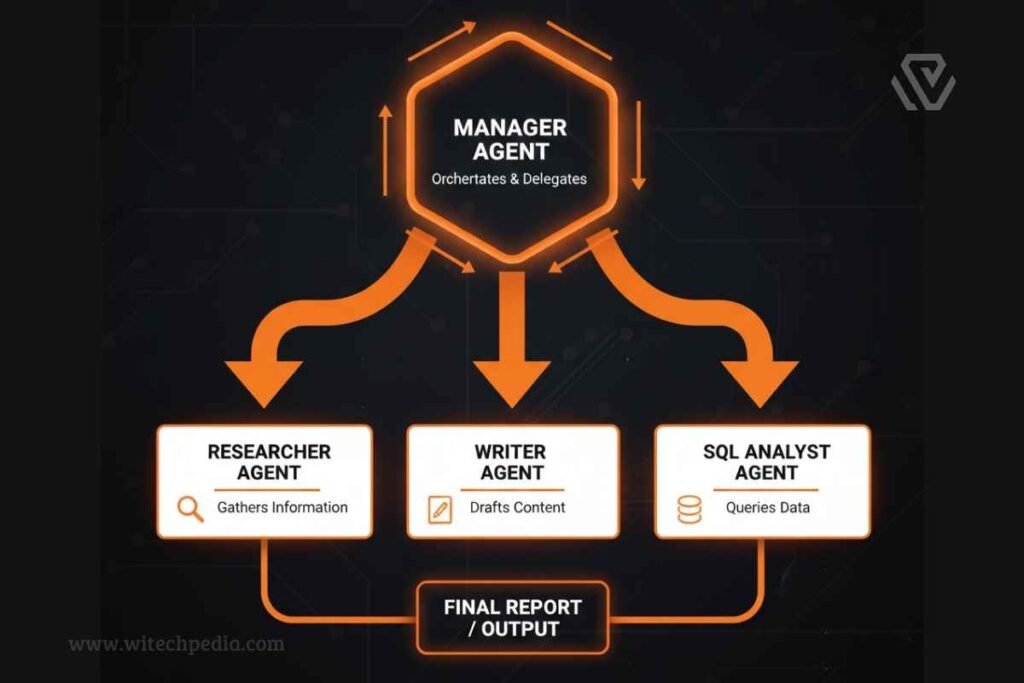
The most advanced way to build agentic AI is through delegation. Instead of one “God Agent” doing everything, you build a hierarchy:
- Manager Agent: Orchestrates the workflow and decides which worker handles what.
- Worker Agents: Specialized in narrow tasks (e.g., SQL querying, image generation, or data cleaning).
Real-World Use Case: Building an Autonomous Research & SEO Agent
To truly master how to build agentic AI, it is helpful to look at a practical application: Autonomous Technical Research.
The Agentic Workflow in Action
- The Planner Agent: Identifies which documentation needs indexing.
- The Researcher Agent: Uses APIs to gather the latest data and self-corrects if it finds dead links.
- The Critic Agent: Fact-checks the research against your Artificial Intelligence Wiki.
Implementation: CrewAI Research Agent Script SEO.
import os
from crewai import Agent, Task, Crew, Process
from langchain_google_genai import ChatGoogleGenerativeAI

# 1. Setup API Keys (Use Gemini 1.5 Pro for high-reasoning tasks)
os.environ["GOOGLE_API_KEY"] = "YOUR_API_KEY"

llm = ChatGoogleGenerativeAI(model="gemini-1.5-pro")

# 2. Define your specialized Agents
researcher = Agent(
  role='Technical Researcher',
  goal='Find and verify the latest developments in {topic}',
  backstory='Expert in technical documentation and GitHub repository analysis.',
  allow_delegation=False,
  llm=llm
)

critic = Agent(
  role='Fact-Checker & Critic',
  goal='Verify all claims made by the researcher for accuracy and citations.',
  backstory='A rigorous technical editor focused on eliminating hallucinations.',
  allow_delegation=True,
  llm=llm
)

writer = Agent(
  role='SEO Content Architect',
  goal='Format the verified research into a WiTechPedia-ready guide.',
  backstory='Specialized in SEO optimization and Bree Serif typography styling.',
  allow_delegation=False,
  llm=llm
)

# 3. Define the Tasks
research_task = Task(description='Research the latest trends in {topic}.', agent=researcher)
verify_task = Task(description='Critique the research and ensure all links are valid.', agent=critic)
write_task = Task(description='Write a 500-word SEO-optimized report.', agent=writer)

# 4. Form the Crew with a Sequential Process
witech_crew = Crew(
  agents=[researcher, critic, writer],
  tasks=[research_task, verify_task, write_task],
  process=Process.sequential # Ensures the Critic acts AFTER the Researcher
)

# 5. Execute the Workflow
result = witech_crew.kickoff(inputs={'topic': 'Agentic AI Workflows 2026'})
print(result)
Why This is “Agentic”
This is not a simple linear script. It is agentic because of its self-correction loop. If the Critic Agent finds an unverified claim, it doesn’t just stop; it sends the Researcher Agent back to find a secondary source without human intervention. This mimics the iterative reasoning found in high-tier models like Google Gemini 1.5 Pro.
Implementation Tip
Security Challenges When You Build Agentic AI

While the benefits are massive, building these systems comes with hurdles:
- Token Optimization: Iterative loops can consume tokens rapidly. Always set a
max_iterationslimit. - Hallucination Loops: Agents can sometimes get stuck in a “logic spiral.”
- Sandbox Safety: Always sandbox your agent’s execution environment using tools like Docker to prevent unauthorized system access.
Frequently Asked Questions (FAQ)
What is the best framework for building agentic AI?
For production-grade control, LangGraph is the industry leader in 2026. For rapid prototyping and ease of use, CrewAI is preferred.
Do I need a high-end GPU to build agentic AI?
No. Most developers use API-based models like Gemini or GPT-4o. However, for local deployments, you would need a GPU with high VRAM to run models like Llama 3 or Mistral.
What is the difference between a chatbot and an AI agent?
A chatbot is reactive (waits for a prompt). An agent is proactive; it receives a high-level goal, breaks it into tasks, and uses tools to execute those tasks autonomously.
How do I give an AI agent memory?
You use a Vector Database (like Pinecone or Weaviate) to store past interactions and relevant documents, which the agent can retrieve using RAG (Retrieval-Augmented Generation).
Summary and Next Steps
Learning how to build agentic AI is the first step toward the future of autonomous software. By combining strong foundation models with robust frameworks like LangGraph, you can create systems that solve complex problems while you sleep.
Ready to dive deeper?
- Explore our Artificial Intelligence Wiki for a historical perspective on the road to agency.
- Need help with deployment? Check our Web Development Services for custom AI integrations for your business.